#include <WiFi.h>
#include <HTTPClient.h>
#include <OneWire.h>
#include <DallasTemperature.h>
#include <Wire.h>
#include <Adafruit_Sensor.h>
#include <Adafruit_ADXL345_U.h>
#include <math.h>
// ==================== CONFIGURATION ====================
const char* WIFI_SSID = “YOUR_WIFI_SSID”;
const char* WIFI_PASS = “YOUR_WIFI_PASSWORD”;
const char* GOOGLE_SCRIPT_URL = “YOUR_GOOGLE_APPS_SCRIPT_WEB_APP_URL”;
const char* MACHINE_NAME = “MACHINE_01”; // ชื่อเครื่องจักร
// — Hardware Pins —
#define SCT_PIN 34 // ADC Pin สำหรับ SCT-013 (ผ่าน DC Bias Circuit)
#define ONE_WIRE_BUS 4 // DS18B20 Data Pin
// — Limits & Ratio Configurations —
// หมายเหตุ: สามารถนำตัวแปรเหล่านี้ไปเชื่อมต่อกับ WiFiManager ในอนาคตได้
float tempCriticalLimit = 75.0; // ลิมิตอุณหภูมิระดับ CRITICAL (°C)
float currentCriticalLimit = 50.0; // ลิมิตกระแสระดับ CRITICAL (A)
const float TEMP_WARN_LIMIT = 60.0; // ลิมิตอุณหภูมิระดับ WARNING (°C)
const float ANOMALY_THRESHOLD = 3.0; // ค่า Z-Score พื้นฐาน
const float Z_CRITICAL_RATIO = 1.5; // ตัวคูณสำหรับ Critical Z-Score (3.0 * 1.5 = 4.5)
const float Z_WARN_RATIO = 1.0; // ตัวคูณสำหรับ Warning Z-Score (3.0 * 1.0 = 3.0)
// — Self-Learning Calibration —
const int LEARN_SAMPLES = 100; // จำนวนตัวอย่างสุ่มอ่านเพื่อเรียนรู้ Baseline
// ==================== OBJECTS & GLOBAL VARIABLES ====================
OneWire oneWire(ONE_WIRE_BUS);
DallasTemperature tempSensor(&oneWire);
Adafruit_ADXL345_Unified accel = Adafruit_ADXL345_Unified(12345);
float vib_baseline_mean = 0.0; // ค่าเฉลี่ยแรงสั่นสะเทือนสภาวะปกติ (Mean)
float vib_baseline_std = 0.0; // ค่าเบี่ยงเบนมาตรฐานปกติ (StdDev)
// ==================== FUNCTIONS ====================
// 1. ระบบเรียนรู้ค่าสั่นสะเทือนพื้นฐานเมื่อเปิดเครื่อง (Self-Learning)
void learnVibrationBaseline() {
Serial.println(“\n[LEARNING] Starting vibration baseline calibration…”);
Serial.println(“[LEARNING] Ensure the machine is running in baseline state…”);
float values[LEARN_SAMPLES];
float sum = 0.0;
for (int i = 0; i < LEARN_SAMPLES; i++) {
sensors_event_t event;
accel.getEvent(&event);
// คำนวณ Vector Magnitude: sqrt(x^2 + y^2 + z^2)
float mag = sqrt(pow(event.acceleration.x, 2) +
pow(event.acceleration.y, 2) +
pow(event.acceleration.z, 2));
values[i] = mag;
sum += mag;
delay(50);
}
// คำนวณค่าเฉลี่ย (Mean)
vib_baseline_mean = sum / LEARN_SAMPLES;
// คำนวณส่วนเบี่ยงเบนมาตรฐาน (Standard Deviation)
float variance_sum = 0.0;
for (int i = 0; i < LEARN_SAMPLES; i++) {
variance_sum += pow(values[i] – vib_baseline_mean, 2);
}
vib_baseline_std = sqrt(variance_sum / LEARN_SAMPLES);
// ป้องกันกรณีป้อนค่า 0 เพื่อหลีกเลี่ยงปัญหา Division by Zero
if (vib_baseline_std < 0.001) vib_baseline_std = 0.001;
Serial.printf(“[LEARNING] Complete! Baseline Mean: %.3f m/s², StdDev: %.3f m/s²\n\n”,
vib_baseline_mean, vib_baseline_std);
}
// 2. อ่านค่ากระแสสมบูรณ์ (SCT-013 60A/1V)
float readCurrentRMS() {
const int SAMPLES = 300;
float sum_sq = 0.0;
for (int i = 0; i < SAMPLES; i++) {
int raw = analogRead(SCT_PIN);
float voltage = ((raw – 2048) / 4095.0) * 3.3; // ลบ Offset Center (~1.65V)
sum_sq += voltage * voltage;
delayMicroseconds(500);
}
float v_rms = sqrt(sum_sq / SAMPLES);
float current_rms = v_rms * 60.0; // อัตราส่วน SCT-013 60A/1V (60A ต่อ 1V RMS)
if (current_rms < 0.2) current_rms = 0.0; // Noise Filter
return current_rms;
}
// 3. อ่านค่าแรงสั่นสะเทือน และคำนวณ Z-Score
void readVibrationAndZScore(float &mag, float &z_score) {
sensors_event_t event;
accel.getEvent(&event);
mag = sqrt(pow(event.acceleration.x, 2) +
pow(event.acceleration.y, 2) +
pow(event.acceleration.z, 2));
// Z-Score = (X – Mean) / StdDev
z_score = (mag – vib_baseline_mean) / vib_baseline_std;
}
// 4. ส่งข้อมูล JSON ไปยัง Google Apps Script (doPost)
void sendToGoogleScript(float temp, float vib, float current, float z_score, String status) {
if (WiFi.status() != WL_CONNECTED) {
Serial.println(“[WIFI] Disconnected, skipping HTTP POST…”);
return;
}
HTTPClient http;
http.begin(GOOGLE_SCRIPT_URL);
http.addHeader(“Content-Type”, “application/json”);
http.setFollowRedirects(HTTPC_STRICT_FOLLOW_REDIRECTS); // รองรับ HTTP 302 Redirection ของ Google Web App
// JSON Payload ให้ตรงกับโครงสร้างที่ doPost(e) รอรับ
String jsonPayload = “{“;
jsonPayload += “\”machine_name\”:\”” + String(MACHINE_NAME) + “\”,”;
jsonPayload += “\”temperature\”:” + String(temp, 2) + “,”;
jsonPayload += “\”vibration\”:” + String(vib, 3) + “,”;
jsonPayload += “\”current\”:” + String(current, 2) + “,”;
jsonPayload += “\”z_score\”:” + String(z_score, 2) + “,”;
jsonPayload += “\”status\”:\”” + status + “\””;
jsonPayload += “}”;
Serial.println(“[HTTP] Sending JSON: ” + jsonPayload);
int httpCode = http.POST(jsonPayload);
if (httpCode > 0) {
String response = http.getString();
Serial.printf(“[HTTP] Response Code: %d, Body: %s\n”, httpCode, response.c_str());
} else {
Serial.printf(“[HTTP] POST Failed, error: %s\n”, http.errorToString(httpCode).c_str());
}
http.end();
}
// ==================== SETUP & LOOP ====================
void setup() {
Serial.begin(115200);
// 1. เชื่อมต่อ WiFi
WiFi.begin(WIFI_SSID, WIFI_PASS);
Serial.print(“Connecting to WiFi”);
while (WiFi.status() != WL_CONNECTED) {
delay(500);
Serial.print(“.”);
}
Serial.println(“\nWiFi Connected!”);
// 2. เริ่มต้นเซนเซอร์
tempSensor.begin();
if (!accel.begin()) {
Serial.println(“ERROR: ADXL345 not found, check wiring!”);
while (1);
}
accel.setRange(ADXL345_RANGE_16G);
// 3. เริ่มกระบวนการ Self-Learning Baseline Vibration
learnVibrationBaseline();
}
void loop() {
// — 1. อ่านค่าเซนเซอร์ทุกตัว —
float currentRMS = readCurrentRMS();
tempSensor.requestTemperatures();
float currentTemp = tempSensor.getTempCByIndex(0);
float currentVib = 0.0;
float zScore = 0.0;
readVibrationAndZScore(currentVib, zScore);
// — 2. ประเมินสถานะ 3 ระดับ (NORMAL / WARNING / CRITICAL) —
String statusStr = “NORMAL”;
bool isAnomaly = false;
// ตรวจจับเงื่อนไข CRITICAL โดยเทียบกับค่า Limit Dynamic
if (currentTemp >= tempCriticalLimit ||
currentRMS >= currentCriticalLimit ||
zScore >= (ANOMALY_THRESHOLD * Z_CRITICAL_RATIO)) {
// 🔴 CRITICAL: สภาวะวิกฤต/ผิดปกติ
statusStr = “CRITICAL”;
isAnomaly = true;
}
else if (currentTemp >= TEMP_WARN_LIMIT || zScore >= (ANOMALY_THRESHOLD * Z_WARN_RATIO)) {
// 🟡 WARNING: เฝ้าระวัง (เริ่มเบี่ยงเบนจาก Baseline)
statusStr = “WARNING”;
isAnomaly = false; // ยังไม่เปิดไฟเตือนกระพริบ
}
else {
// 🟢 NORMAL: เครื่องจักรทำงานสมบูรณ์ปกติ
statusStr = “NORMAL”;
isAnomaly = false;
}
// พิมพ์ Log แสดงผลการประเมิน
Serial.printf(“[%s] Temp: %.2f °C | Curr: %.2f A | Vib: %.3f m/s² | Z-Score: %.2f | Status: %s (Anomaly: %s)\n”,
MACHINE_NAME, currentTemp, currentRMS, currentVib, zScore, statusStr.c_str(), isAnomaly ? “TRUE” : “FALSE”);
// — 3. ส่งเข้า Google Apps Script —
sendToGoogleScript(currentTemp, currentVib, currentRMS, zScore, statusStr);
delay(5000); // ส่งข้อมูลทุกๆ 5 วินาที
}
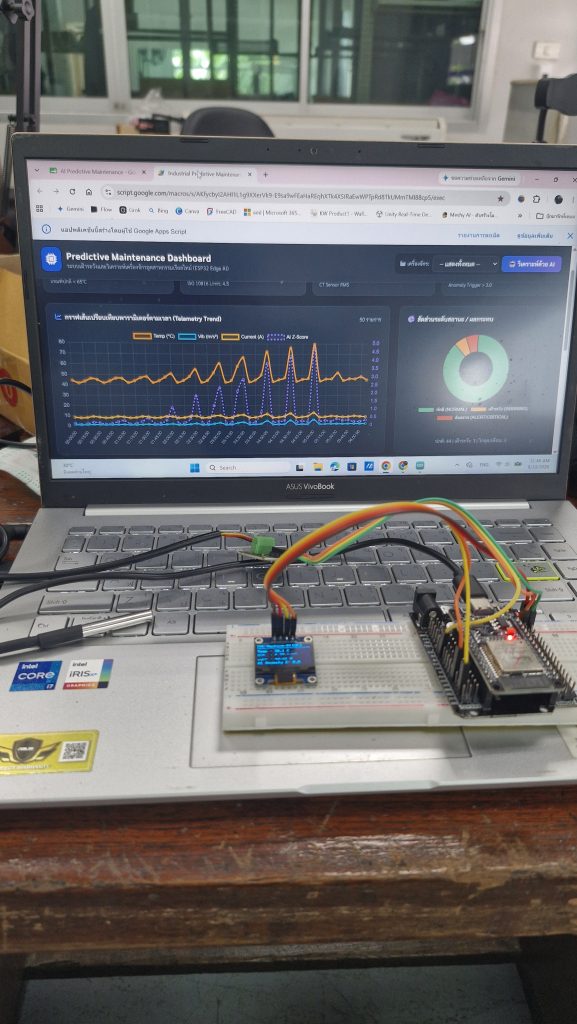
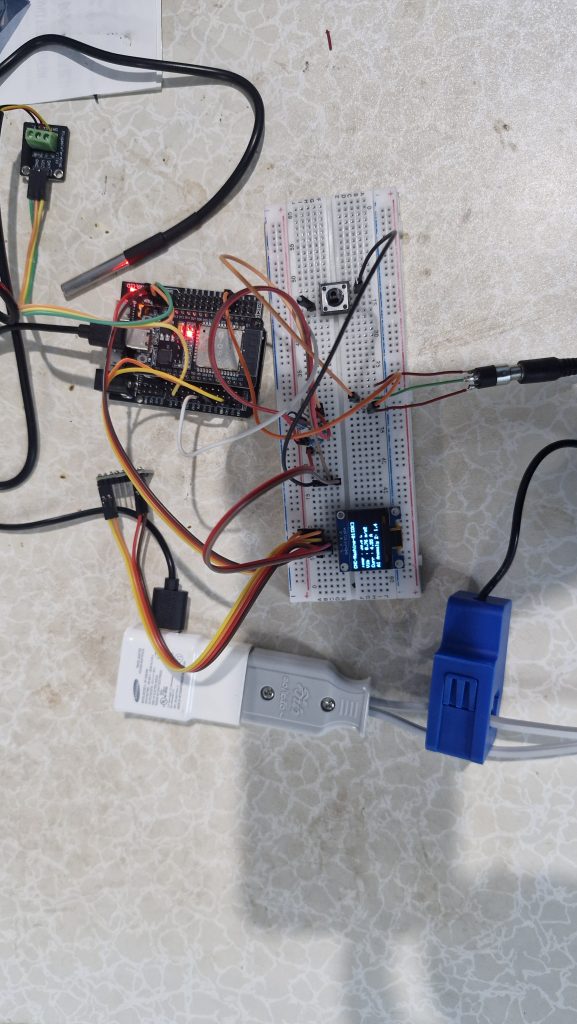
ระบบเฝ้าระวังและตรวจจับความผิดปกติของเครื่องจักรในอุตสาหกรรม (Machine Condition Monitoring & Anomaly Detection) โดยใช้บอร์ด ESP32 ทำงานร่วมกับเซนเซอร์ 3 ชนิด และส่งข้อมูลขึ้น Google Sheets / Google Apps Script เพื่อนำไปทำ Dashboard หรือระบบแจ้งเตือนต่อไป